The browser (experimental)
The kernel can run inside a web page, with cells in a Web Worker and no server or Jupyter install. It is a proof of concept: it has an npm export but no kernelspec, and it isn't covered by the support policy.
How it fits
The kernel's message handling, KernelCore in src/kernel-core.ts, has no Node imports. It talks to frontends through a KernelChannels transport and runs cells on a KernelTarget. The kernel process (src/kernel.ts) gives it ZeroMQ (src/zmq-channels.ts) and the runtimes in Runtime integrations. In a page, src/browser/mod.ts gives it:
PageChannels(src/browser/channels.ts): the frontend callssend(channel, msg)with messages in Jupyter's JSON shape (header,parent_header,metadata,content,buffers), the shape the websocket's JSON protocol and@jupyterlab/servicesuse, and gets every reply, iopub and stdin message throughonMessage. There is no signing: the frontend and the kernel share a page.BrowserTarget(src/browser/target.ts): a module Worker that the page creates, runningruntime/browser-worker.mjs. Requests and replies are messages in the same shape as the workerd driver's session, and cells are transformed the same way (transformCellForEval), so they run as global code and their declarations persist.
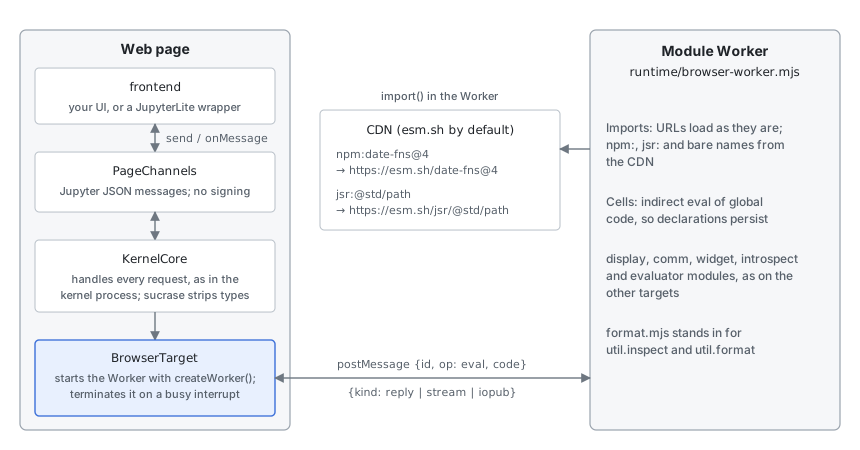
The Worker loads the same display.mjs, comm.mjs, widget.mjs, introspect.mjs and evaluator.mjs as the other targets. runtime/format.mjs stands in for util.inspect and util.format.
Use
From npm, with a bundler that handles worker imports (Vite: ?worker&url):
import { startBrowserKernel } from "@tlockney/cdp-kernel/browser";
import workerUrl from "@tlockney/cdp-kernel/browser/worker?worker&url";

const kernel = startBrowserKernel({
  createWorker: () => new Worker(workerUrl, { type: "module" }),
});
@tlockney/cdp-kernel/browser is dist/browser/kernel.js and .../browser/worker is dist/browser/worker.js, both from scripts/build-browser.mjs, which npm run build runs. Not on JSR yet. From a checkout:
node scripts/build-browser.mjs dist/browser # kernel.js and worker.jsimport { startBrowserKernel } from "./kernel.js";
const kernel = startBrowserKernel({
createWorker: () => new Worker("./worker.js", { type: "module" }),
});
kernel.onMessage((channel, msg) => console.log(channel, msg.header.msg_type, msg.content));
kernel.send("shell", {
header: { msg_id: crypto.randomUUID(), msg_type: "execute_request", session: "s", username: "", date: new Date().toISOString(), version: "5.3" },
parent_header: {},
metadata: {},
content: { code: "const x: number = 21; x * 2", silent: false, store_history: true, allow_stdin: false, stop_on_error: true },
});test/browser.test.ts runs a page like this in headless Chromium, WebKit and Firefox, through Playwright; CI runs it in all three. Safari itself, on macOS or iOS, isn't tested.
Host features
A page that embeds the kernel, such as an app's WebView, can offer cells features of its own (#384). Three options to startBrowserKernel, all optional:
preload: module URLs the Worker imports before the first cell, each time it starts (so again after a restart), resolved againstbase. A module whose default export is a function has it called with{ host, jupyter }. A module that fails to load is reported on stderr and the kernel runs without it.host: answers the Worker's requests. In a preload module,host.request(method, params, { signal, transfer })resolves with what the handler returns, or rejects with anErrorcarrying the thrown error'sname,messageandcode. The handler gets anAbortSignalthat aborts when the Worker aborts the call or stops, and on every interrupt: an interrupt cancels each request in flight, and itshost.requestpromise rejects with anAbortError. Values cross by structured clone.capabilities: returned ascapabilitiesinkernel_info_reply, so a frontend can see what the page offers.
kernel.notifyHost(event, value) sends an event to the Worker's host.onEvent((event, value) => …) listeners. Cells only see what a preload module chooses to install, for example a global:
// device.mjs, listed in preload
export default function ({ host }) {
  globalThis.device = {
    clipboard: { readText: () => host.request("clipboard.readText", {}) },
  };
}const kernel = startBrowserKernel({
createWorker: () => new Worker(workerUrl, { type: "module" }),
preload: [new URL("./device.mjs", import.meta.url).href],
host: async ({ method }) => {
if (method === "clipboard.readText") return await navigator.clipboard.readText();
throw Object.assign(new Error(`no ${method}`), { code: "unavailable" });
},
capabilities: { device: ["clipboard.readText"] },
});What works
- TypeScript and TSX, stripped by sucrase (esbuild's native binary can't run in a page), top-level
await, and state from cell to cell. consoleoutput, thejupyterdisplay namespace, rich results, errors with their stack, comms, completion from runtime values, and inspection.- Imports. Relative imports and URLs load as they are.
npm:,jsr:and bare package names load from a CDN, esm.sh by default (thecdnoption):npm:date-fns@4becomeshttps://esm.sh/date-fns@4, andjsr:@std/pathbecomeshttps://esm.sh/jsr/@std/path. - Interrupt. A cell waiting on a promise is abandoned and the Worker keeps its state, as on workerd. A busy cell can't be stopped in place, so the Worker is terminated and a new one starts on the next cell, without the earlier cells' state.
Not yet
prompt()andconfirm()answer as when the frontend has no stdin. A synchronous prompt in a Worker needsSharedArrayBufferandAtomics.wait, so a cross-origin isolated page (COOP and COEP headers).- Typed completion. The language service runs in a browser, but
src/language-service-worker.tsreads its lib files from disk and installs@typespackages with npm. - The visual debugger: a page has no CDP.
Deno.*and Node's builtins, beyond what esm.sh polyfills fornode:imports.- Files:
jupyter.image(path)has no file system to read. - A frontend. The kernel speaks the message protocol; a page still needs something to show it, such as a JupyterLite kernel wrapper or Ganymede's engine in the page.